For iPhone & iPad · iOS / iPadOS 18+
GestureCam Hands-free camera app for iPhone & iPad
Get inthe picture.
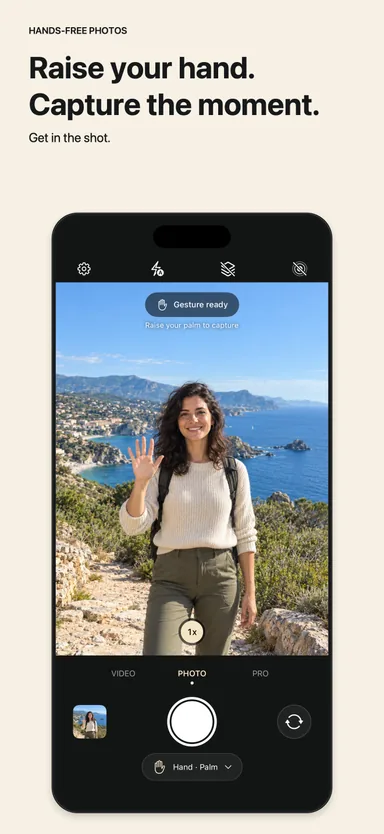
Take photos and videos without touching your iPhone. Set it down, step into the frame, and raise your palm to start the countdown, or with Pro, just hold still and Auto Capture takes the photo. No timer rush, no remote.
Free palm-triggered photos & video. Optional one-time Pro upgrade.
- No remote required
- Photos, Live Photos & video
- On-device gesture processing
At a glance.
GestureCam is a free camera app for iPhone and iPad that takes photos and videos without you touching the phone. Prop the phone up, step into the frame, and raise your open palm: a short countdown starts, then GestureCam takes a photo or Live Photo, or starts a video with sound. On the back camera, torch flashes and a sound mark the end of the countdown, so you know when it fires from across the room. An optional one-time GestureCam Pro upgrade adds voice commands such as “take photo”, fist and victory-sign triggers, burst mode, manual camera controls, and Auto Capture, which takes a photo as soon as everyone in the frame holds still and keeps taking more while the pose lasts. Gesture and camera processing stays on your device.
- What it does
- Takes photos, Live Photos, and videos when you raise your palm, so you don't have to press the shutter or use a remote.
- Devices
- iPhone with iOS 18.0+ and iPad with iPadOS 18.0+.
- Free features
- Palm-triggered photos, Live Photos, and video with sound; adjustable hold time and countdown; torch-flash and sound cues; front and back cameras; and a gallery.
- Optional purchase
- GestureCam Pro is a one-time purchase for Auto Capture, voice commands, fist and victory-sign triggers, burst capture, and manual controls. No subscription.
- Languages
- English, Arabic, French, German, Japanese, Simplified Chinese, Spanish, and Turkish, including voice commands in German, French, and Japanese.
- Good for
- Solo portraits, couple and group photos, and filming yourself when nobody is free to hold the phone.
When GestureCam helps.
- Selfies without a timer rush
- The Camera timer starts counting when you tap the shutter. With GestureCam, you start the countdown from where you stand, once you are ready.
- Group photos without a tripod remote
- Lean the phone against something steady, join the group, and raise your palm. Nobody has to hold a Bluetooth remote or stay behind the camera.
- When your hands are busy
- Cooking, playing an instrument, a workout, or a craft: raise a hand for a moment to start recording, or use voice commands with Pro.
- Posed shots with no signal at all
- With Auto Capture in Pro, nobody raises a hand. Start a session, get into the frame, and hold still: the photo is taken about a second later, then again every few seconds while you hold the pose.
- Filming yourself
- Start a video with your palm, and choose whether the same gesture also stops it.
- If reaching the shutter is hard
- When pressing the on-screen button or reaching a phone on a stand is difficult, an open-palm gesture or, with Pro, a spoken command can take the photo instead.
Hands-free group photos Solo, together.
A solo portrait, a photo with your partner, or the whole group. Join the frame before starting the countdown.
Adjustable self-timer countdown Ready when you are.
Adjust the hold time and countdown to leave a little room for finding your place and lowering your hand.
Countdown sound & torch flash A clearer signal.
Recognition feedback, a countdown sound, and torch flashes help you follow the capture from your position.
From the App Store
What people are saying.
Selected review excerpts from App Stores around the world.
Just used this on a solo trip and it was great!…
Great camera app for taking selfie or group photos!!
The app works flawlessly, I use it a lot. Highly recommended!
Hızlı bir şekilde akıyor ve istenileni yapıyor
It runs quickly and does what it’s supposed to.
Guys you did an incredible job thank you
Great idea. Would be great if it continues to develop.
Gracias a esta aplicacion, puedes disparar la camara del telefono sin necesidad de usar los botones.…
Thanks to this app, you can trigger your phone’s camera without using the buttons.
Reviews checked . Original wording is preserved; English translations are labeled.
Start simple
Your next photo, in three small steps.
Set the scene
Place your device on a stable support, choose the camera, and frame the picture.
Find your place
Step into view. Give the camera a clear view of your open palm to begin the countdown.
Keep the moment
Lower your hand, settle into the picture, and review the result in the built-in gallery.
A clear starting point
Try it free.Choose a little more.
Optional upgrades are purchased in the app. Current local pricing is shown in the App Store and app.
Free
Start with the hands-free essentials.
- Palm-triggered photos and Live Photos
- Palm-triggered video
- Adjustable hold time and countdown
- Gallery to review, share, and save
One-time upgrade
Extra control when you want it. No subscription.
- Auto Capture: photos taken when everyone holds still
- Voice control with custom command phrases
- Palm, fist, or victory-sign triggers
- Burst capture with adjustable timing
- Manual focus, exposure, ISO, and more
A few ideas to get you started
Make it your own.
Auto Capture not taking a photo? Reasons and fixes
If GestureCam’s Auto Capture keeps showing “Hold still…” or doesn’t start, the reason is almost always one of a few simple things. Here is how to find and fix each one.
Read the guide GuidesFamily photo poses that work when nobody is behind the camera
When the whole family is in the picture, nobody can direct the shot. These poses are easy to set up, easy to hold, and work with a timer, a hand gesture, or Auto Capture.
Read the guide GuidesHow to take a professional headshot at home with your iPhone
You need a new profile photo and nobody is around to take it. Here is a window-light setup, the right phone height, and a way to get dozens of takes without touching the screen.
Read the guide GuidesHow to take outfit photos by yourself with an iPhone
Mirror selfies hide your face behind the phone and a timer gives you one rushed pose. This guide shows a full-length setup that takes a photo every time you settle into a pose.
Read the guide GuidesHow to take couple photos yourself, without a photographer
Asking a stranger rarely gets the photo you hoped for, and a timer rushes you both. Here is how to set up couple photos yourself and get several relaxed takes in one go.
Read the guide GuidesHow to take solo travel photos of yourself with an iPhone
Travelling alone means coming home with landscapes and no photos of you. This guide covers a light kit, safe phone placement, and a hands-free way to get several good takes.
Read the guide GuidesHow to take a group photo where everyone is actually ready
Most group photos fail because one person was still talking, turning, or fixing their hair. Here is a setup where the camera waits until the whole group has settled.
Read the guide GuidesMeet Auto Capture: iPhone photos that take themselves when you hold still
GestureCam’s new Auto Capture takes a photo as soon as everyone in the frame holds still, then keeps taking more while you pose. No timer, no remote, no hand signal.
Read the guide GuidesHow to take a photo on iPhone without touching it
Six ways to take an iPhone photo without touching the phone, from the built-in timer to Voice Control, AirPods, Apple Watch, and a palm gesture. What each needs, and which one fits your shot.
Read the guide GuidesHow to Take Holiday Group Photos When You’re the One With the iPhone
Every family has a photographer who is missing from the holiday pictures. Here is how to set up your iPhone, arrange the group, handle festive lighting, and join the photo yourself.
Read the guide GuidesBest iPhone Camera Apps for 2027: Picks for Every Shooting Situation
The right iPhone camera app depends on the moment you want to capture. Here are six picks for group photos, travel, video, selfies, and everyday shots, what each one costs, and direct download links.
Read the guide GuidesHow to take hands-free photos on iPhone
Use the iPhone camera timer for a simple group shot, or raise your palm in GestureCam when you want to start the countdown from inside the frame.
Read the guide GuidesiPhone camera timer or GestureCam? Choose your photo setup
A practical comparison for solo portraits and group photos: start a timer at the phone, or signal when you are already in the frame.
Read the guideHow do I take a photo on iPhone without pressing the button?
Prop your iPhone up, open GestureCam, and raise your open palm toward the camera. After a short countdown, the photo is taken. Without an extra app, you can use the Camera timer, which starts when you tap the shutter, or Camera Remote on an Apple Watch.
Is GestureCam a hands-free selfie app?
Yes. GestureCam takes selfies and portraits with the front or back camera when you raise your palm, so you don't have to touch the screen. Palm-triggered photos and video are free.
Can GestureCam take a photo automatically without a gesture?
Yes, with GestureCam Pro, a one-time purchase with no subscription. Auto Capture, added in version 1.3, takes a photo about a second after everyone in the frame holds still, then another roughly every three seconds while the pose is held. No hand signal, voice command, or timer is needed. It works for photos, not video.
Is there an app like Smart Take for iPhones other than iPhone Duo?
Yes. Apple’s Smart Take is only on iPhone Duo. GestureCam’s Auto Capture brings the same hold-still idea to iPhones running iOS 18 or later: it takes a photo about a second after everyone in the frame holds still, then about every three seconds while the pose is held. It is part of GestureCam Pro and works for photos only.
Can I take a photo with a hand sign?
Yes. An open palm is the free trigger. GestureCam Pro also lets you use a fist or a victory sign to start the countdown.
Can I control the iPhone camera with my voice?
Yes, with GestureCam Pro. Say “take photo”, “start video”, “stop video”, “front camera”, or “flash on”, or set your own phrases in your language. Voice commands work with AirPods and other Bluetooth microphones.
How is GestureCam different from the iPhone camera timer?
The built-in timer starts counting when you tap the shutter, so you have a few seconds to get into place. GestureCam starts the countdown when you raise your palm from inside the frame, so you can take as long as you need to get ready.
How do I take a group photo without a tripod remote?
Rest the phone on a stable surface or stand, frame the group in GestureCam, join the group, and raise your palm. No Bluetooth remote is needed. Torch flashes and a sound tell everyone when the countdown ends.
Can I take hands-free photos for free?
Yes. Palm-triggered photos, Live Photos, and video are free. GestureCam Pro is an optional one-time purchase for additional controls.
Can GestureCam help if I have limited hand mobility?
It can help when pressing the shutter or reaching a phone on a stand is hard. The free palm trigger needs one open hand visible to the camera; with GestureCam Pro, spoken commands need no hand gesture. iOS also has built-in Voice Control and Switch Control in Accessibility settings.
Which devices and languages does GestureCam support?
GestureCam supports iPhone with iOS 18.0 or later and iPad with iPadOS 18.0 or later, in English, Arabic, French, German, Japanese, Simplified Chinese, Spanish, and Turkish. Check the App Store for the complete current compatibility list.
What if my palm is not recognized?
Try a clear view of your whole hand, better light, and a simpler background. Check the recognition feedback at a closer position before setting up the final shot.
Where are camera and gesture inputs processed?
Camera and gesture processing happens on your device. The App Store description states that photos, videos, and voice are not uploaded to the developer. See the privacy policy for the full details, including other app data.
Make room for yourself in the frame.
Try the palm trigger on your next solo portrait or group photo.