Made for iPad · iPadOS 17.6+
My First Coloring & Drawing Offline coloring app for kids on iPad
Big ideas.Little artists.
A playful art space for iPad. Pick a picture, choose a color, and see where imagination goes—with easy brushes, fill tools, and stickers.
Free pages to try. Optional lifetime unlock for premium pages.
- No ads or accounts
- Creative play works offline
- Grown-up gates
At a glance.
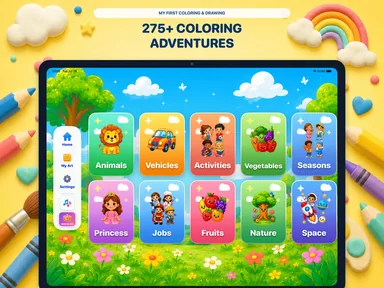
My First Coloring & Drawing is an offline coloring and drawing app for kids on iPad. Children pick a coloring page from themes such as animals, vehicles, space, and nature, then color with brushes, crayons, fill tools, sparkle effects, and stickers, with undo and redo along the way. Finished pictures go to the My Art gallery, where a grown-up can help save them to Photos, print, or share. There are no ads, accounts, or social feed, and creative play works offline after download. A selection of pages is free, and one optional lifetime purchase unlocks all 275+ pages, with no subscription.
- Devices
- Designed for iPad with iPadOS 17.6 or later.
- Free and paid pages
- A selection of pages is free. One optional lifetime purchase unlocks all premium coloring pages. No subscription.
- Offline use
- Creative play works offline after download. No ads, accounts, or social feed.
- Good for
- Coloring, drawing, and decorating with brushes, fill tools, and stickers. Finished creations stay in My Art.
When a coloring app for kids helps.
- Car rides and flights
- Creative play works offline after download. Open the app and pick a page before you leave, so everything is ready without Wi-Fi or mobile data.
- Waiting rooms and restaurants
- A free coloring page and a few stickers make a short, quiet activity on iPad, with no ads or video feed to tap into.
- Quiet time at home
- Choose a theme together, such as animals or space, and let a favorite color start the story. Undo and redo make it easy to try again.
- Keeping their art
- Finished drawings stay in My Art. A grown-up can save a picture to Photos, print it for the fridge, or share it with family.
- Screen time you can check
- No accounts, no social feed, and a grown-up math gate in front of purchases, settings, and sharing.
Kids coloring pages A picture to begin with.
Animals, vehicles, space, nature, and more. Choose a familiar subject or follow a new curiosity.
Brushes, fill tools & stickers Room to experiment.
Brushes, crayons, fill tools, sparkle effects, and stickers make room for different kinds of marks. Undo and redo help along the way.
Save & print their art A place for their art.
Finished creations belong in My Art. Save, print, or share with a grown-up when you choose.
Start simple
From a favorite color to a little masterpiece.
Choose an adventure
Explore the themes together and pick a free page to try.
Follow the idea
Draw, fill, erase, and decorate. A surprising color can be the start of a new story.
Keep the creation
Return to My Art to find finished pictures. A grown-up can help with sharing and printing.
A clear starting point
Try it free.Choose a little more.
Optional upgrades are purchased in the app. Current local pricing is shown in the App Store and app.
Free pages
Try the app with an included selection.
- A selection of coloring pages
- Creative tools and playful stickers
- My Art gallery
- Offline creative play after download
Lifetime unlock
One optional purchase. No subscription.
- Unlock all premium coloring pages
- Explore the full collection of 275+ pages
- Kid-friendly themes and categories
- Purchase protected by a grown-up gate
A few ideas to get you started
Make it your own.
Offline drawing activities for kids on iPad
Prepare a few coloring pages before a trip, then try three simple drawing prompts without Wi-Fi: invent a destination, decorate an animal, or build a picture together.
Read the guide Play5 creative activities for My First Coloring & Drawing
Turn one coloring page into a little story with five open-ended prompts: a tiny palette, a new season, a character, a texture, or a postcard.
Read the guideDoes the app work on iPhone?
The current app is designed for iPad and requires iPadOS 17.6 or later. Check its App Store listing for the complete compatibility information.
Can my child color without an internet connection?
Creative play works offline after download. Before a trip, open the app, choose a page, and try the activity without a connection so the setup is ready.
Are there ads, accounts, or a social feed?
No. The app has no ads, accounts, or social feed. Drawings and unfinished work stay on the device.
Is there a subscription?
No. Some pages are free, and a single optional lifetime purchase unlocks all premium coloring pages. Current local pricing is shown in the App Store and app.
How are purchases and sharing handled?
Purchases, settings, and sharing are behind a grown-up math gate. A grown-up can help choose how artwork is saved or shared.
Where can we find finished drawings?
Finished creations are kept in the personal My Art gallery. The app also supports saving to Photos, printing, and sharing with a grown-up.
Let a little imagination take the lead.
Pick a free page and make the first mark together.